Learn · Epistemic notes
Epistemic notes: organise your research by what you actually know
You cannot write a thesis from notes that all look the same. Epistemic notes organise research by the status of your knowledge, what you can defend, what you assume, what is still open, and what you ruled out, so your argument and its sources are visible instead of trapped in memory.
You open the document to start writing, and the notes betray you. Somewhere in three hundred of them is the evidence for your argument. Somewhere else is the thing you only assumed. And the source that would back the strong claim, a paper you read months ago, you can no longer find. From the outside the notes look identical: same font, same folder, same tidy title. So the line between what you can defend and what you are guessing, and the source that would support it, lives in one place only, your memory, and it is late.
Epistemic simply means "about knowledge." Epistemic notes organise your notes by the status of your knowledge rather than by topic. I think of it as a viewpoint into what you know. And it rests on one idea:
Traditional note systems organise information. Epistemic notes organise the status of your knowledge.
That line is the lens. Everything below follows from it.
The short version:
- Colour a note by its epistemic state, not its topic.
- Four states: ◆ Open, ▲ Working, ● Evidence, ■ Ruled out.
- Folder is state, tag is topic, link is relationship, and the source travels with every note.
- A folder is a verdict. A new note sits in the root, grey, until you have appraised it.
- The payoff: a thesis you can defend, with every claim tracing back to its source.
Why the usual systems leave you stuck
It is not that you were careless, and it is not a better-folders problem. Almost every note tool organises by topic (a folder called "methods") or by how finished a note looks (a maturity tag: seedling, evergreen). Almost none organise by what a thesis is actually made of: what you know, versus what you assume, versus what is still open. So the epistemic status of a note, the one thing you most need when you sit down to write, is exactly the thing your tool never records.
The four states
Marking the confidence of a note is not new. Maggie Appleton writes an epistemic-disclosure line at the top of her essays; Gwern tags claims with a certainty level. Epistemic notes take that idea and make it structural, so it is not a sentence you write and forget, it is where the note lives. Four states, and a note that carries a claim sits in one of them:
- ◆ Open: you looked, and it is a genuine gap. What must I still learn?
- ▲ Working: your hypothesis, under test. What am I assuming?
- ● Evidence: something you can defend, with its source. Can I defend this?
- ■ Ruled out: a lead you dropped, kept with the reason. Why did I abandon it?
You earn a state by appraising the note. A new note starts in the vault root, grey, not judged yet, and it gets a folder only once you have read it and decided what you found. Then you drag it in. Some notes go amber in the first week, some stay violet for years, some end rose, and no conveyor carries them along. Think of it as a triage board. The states apply only to notes that make or track a knowledge claim, so meeting notes, plans and drafts carry no state and stay in the root.
Give each state a colour, and keep the shape as its mark, so it still works for the roughly one in twelve men with colour-vision deficiency, and in dark mode, and in greyscale. Now open your graph view. The grey is everything you have not judged yet, and it shrinks as you appraise. That is a progress bar you never had to fake.
Why not just use tags?
Because topic-folders and status-tags tangle the moment you ask them to do more than one job. Epistemic notes give each part of your vault exactly one:
- Folder is the note's epistemic state.
- Tag is classification: topic, method, project.
- Link is relationship: a finding to its source, a source to a method.
- Filename is a human-readable name.
Now you never wonder whether to change a folder, a tag, or a property. When your reading changes your mind about a note, you drag it to the folder that now fits. That is why the state is a folder and not a tag: a folder holds one verdict at a time, and moving the file is the act of changing your mind.
The same four states, whatever you are doing
The states are one scale that wears different words per task, and one paper usually feeds several of them. Say you appraise a cohort study. The one claim from it you could defend to an examiner goes to Evidence. Its over-reach, the causal language its design cannot carry, goes to Ruled out, with a note on why. The finding you think is plausible but untested in your own population goes to Working, and the question it leaves hanging goes to Open. Same four colours on the paper you appraise and on the argument you write: Evidence is "what a source demonstrates," and it is also "the claim your work defends."
A thesis is not the sum of your amber notes
This is the part that saves a viva, the oral thesis defence. A defensible thesis is not a pile of Evidence. It is an argument that also states its limitations (the notes still in Working and Open) and engages the contrasting evidence (the notes you Ruled out, and why).
Ruled out holds two different things, and it pays to keep them apart. A paper you excluded on quality or method is finished with; it does not come back. A finding that contrasts with yours, that you weighed and set aside for a stated reason, has to come back, in the Discussion, because that is where an examiner will look for it. Same folder, same rose square, different obligation. Write the reason into the note and you will always know which one you are holding.
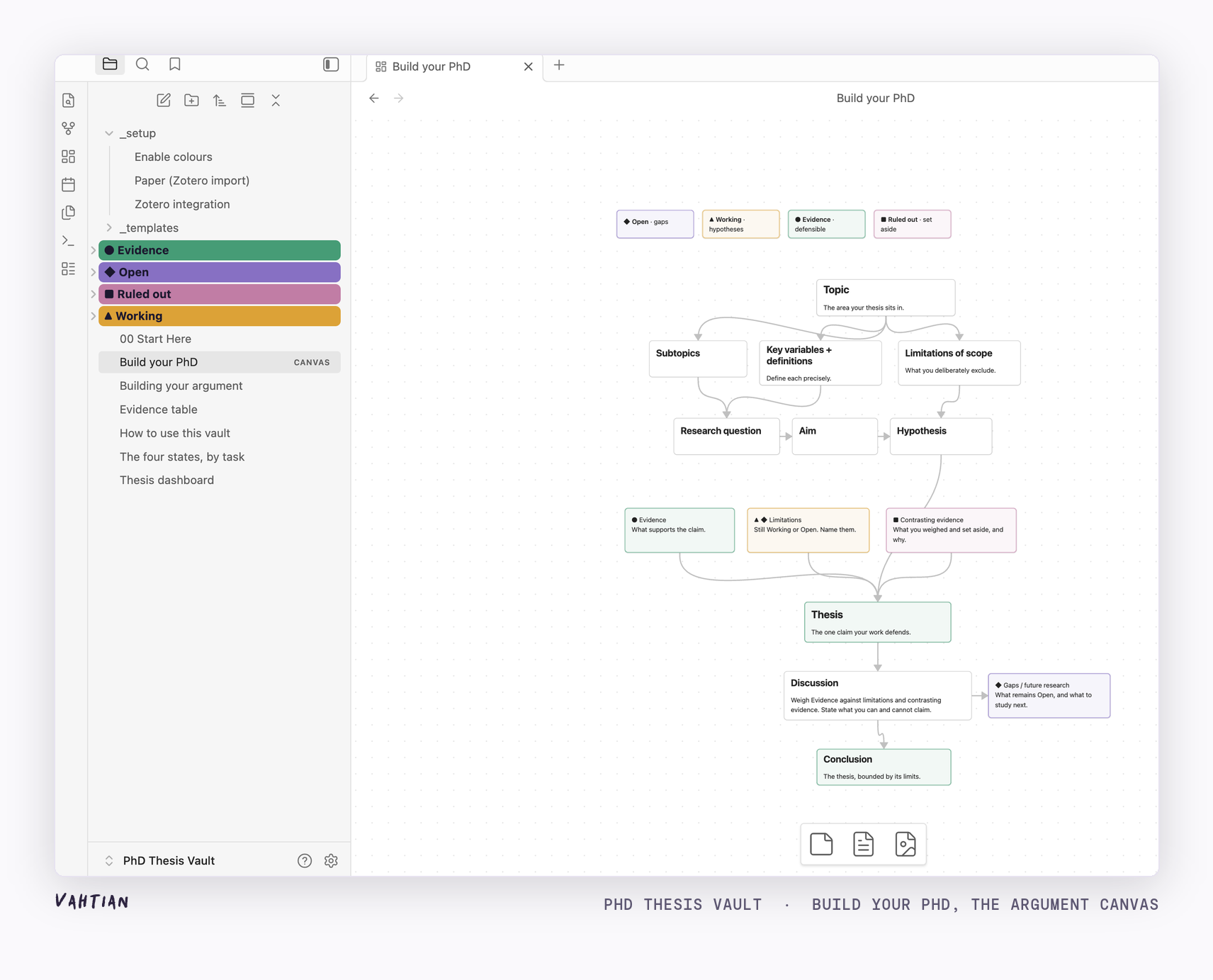
Keep the source with every note, and the manuscript builds itself from the map. Your Evidence becomes the claims you can stand behind; your Working and Open become the limitations; your Ruled out becomes the contrasting evidence you address in the Discussion. Because each note carries its source, every sentence in the manuscript can point back to where it came from, which is exactly what a reviewer will ask you to do.
Two optional extras, both off by default
The method needs nothing but four folders. The free vault ships two extras anyway, and both arrive switched off, because neither one is allowed to touch a verdict. Sprint Familiar is a bundled plugin for timed research sprints: a sprint starts by naming one research decision, and it ends by recording what changed in the argument, claims written, sources linked, assumptions made visible, questions opened, paths ruled out. Each reviewed sprint becomes a dated note in _sprints/. It reads your notes and writes only its own records, and it has no move or rename calls, so it cannot drag a note between folders. _setup/suggest_tags.py is a local script that suggests tags from your vault's own vocabulary, plus links you have not made yet, and writes them into one checkbox review note you tick through. It never moves a file, never edits a note, and never assigns a state.
Two plain facts before you count on the plugin. Obsidian opens any new vault in Restricted Mode, so you enable it yourself, one switch in Settings, and that caution is Obsidian doing its job. And a plugin shipped inside a zip does not update itself, so you get the build that is in the download.
What it does not do
Epistemic notes show you where your evidence is thin. They do not decide whether your thesis is good, and they do not check whether a source supports the sentence you cite it for. When you want that check, CiteVahti is free and runs on your machine. You stay the judge either way.
The method works in any Obsidian vault. Make four folders, leave new notes outside them until you have judged them, and drag each into the folder that matches what you found.
If you would rather start from something built, the PhD Thesis Vault ships the four colour-coded states, note templates, an argument canvas, and a Zotero flow that links every finding to its source. Free, pay what you want, and your notes stay on your device.
Get the PhD Thesis Vault (free)Read next
Obsidian for researchers, 5 questions answered, and more on the Learn page.